Generate a Full Slide Deck From a Single Prompt
The AI slide deck generator that turns a single prompt into a full deck of editable slides. Refine each one, present full-screen, then export to PowerPoint or PDF. A full library of designer templates, grounded in what you actually know.
An AI Slide Deck Generator That Writes and Designs for You
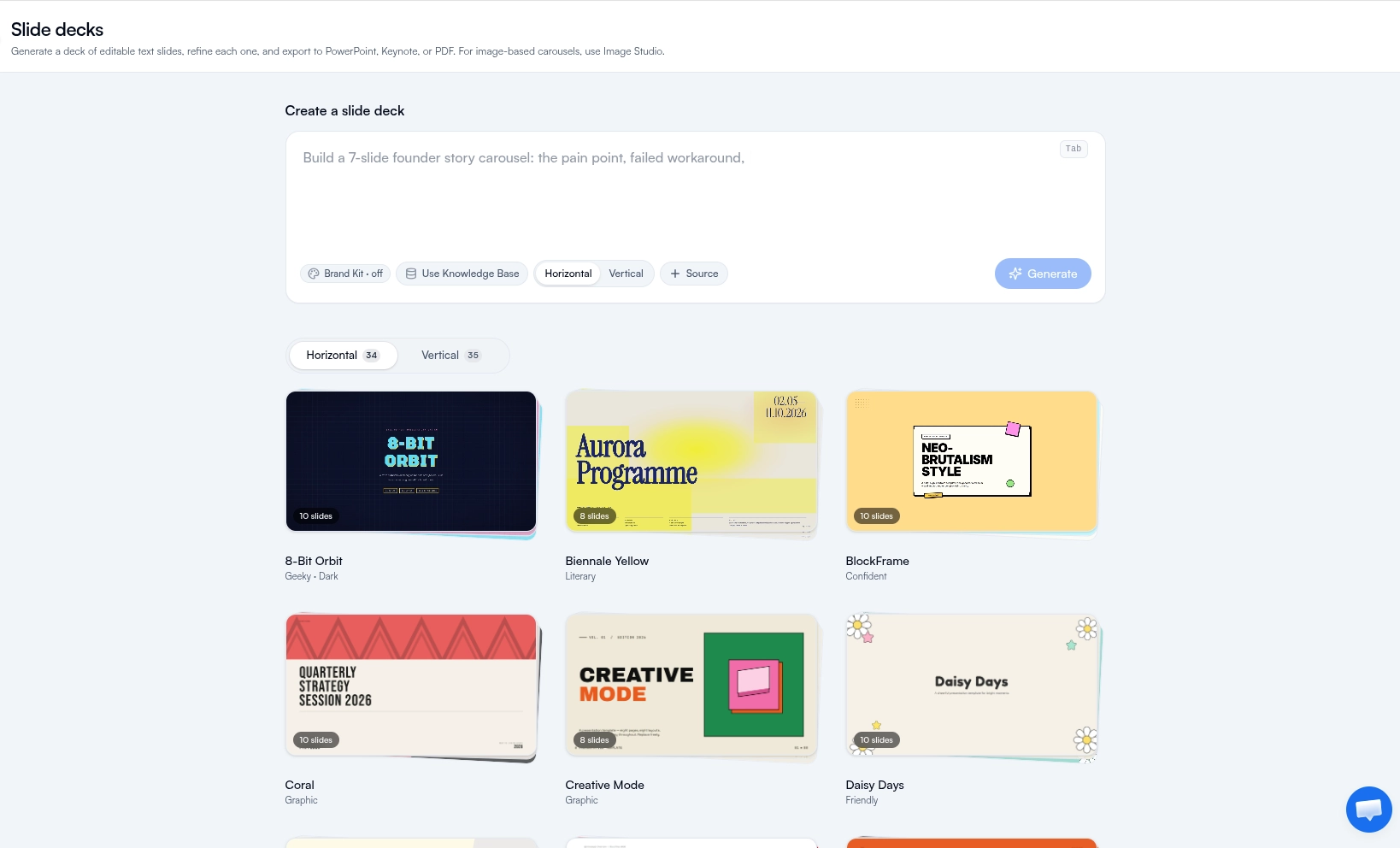
FeedBoss is an AI slide deck generator that writes a full deck of editable text slides from one prompt, then hands you the controls. Pick a template or let FeedBoss choose, edit any slide in place, and regenerate a single slide when it is not quite right. Ground the whole deck in your Knowledge Base, a PDF, or a URL so it stays accurate, and keep it on brand automatically. When you want graphics-led, image-based carousels instead, the Image Studio has you covered.
Everything in Slide Decks
One Prompt, Full Deck
Describe your topic and FeedBoss writes a complete deck of editable text slides, structured with a hook, body, and close. Most decks land at 6 to 12 slides.
A Library of Designer Templates
Editorial, Swiss, Bold, Luxury, Tech, Retro, Minimal, and more, each a full type and color system. Or choose Auto and let FeedBoss pick the style that fits your topic.
Editable Text, Not Flat Images
Every slide is real, editable text, so you can fix a word, rewrite a headline, or restyle a slide in seconds. For image-based carousels, use Image Studio instead.
Grounded in What You Know
Turn on your Knowledge Base, attach a PDF, or paste a URL and FeedBoss builds the deck from your actual material instead of inventing facts.
On-Brand by Default
Flip on Brand Kit and your deck picks up your brand colors and fonts, so it looks like you without manual restyling.
Inline & Popover Editing
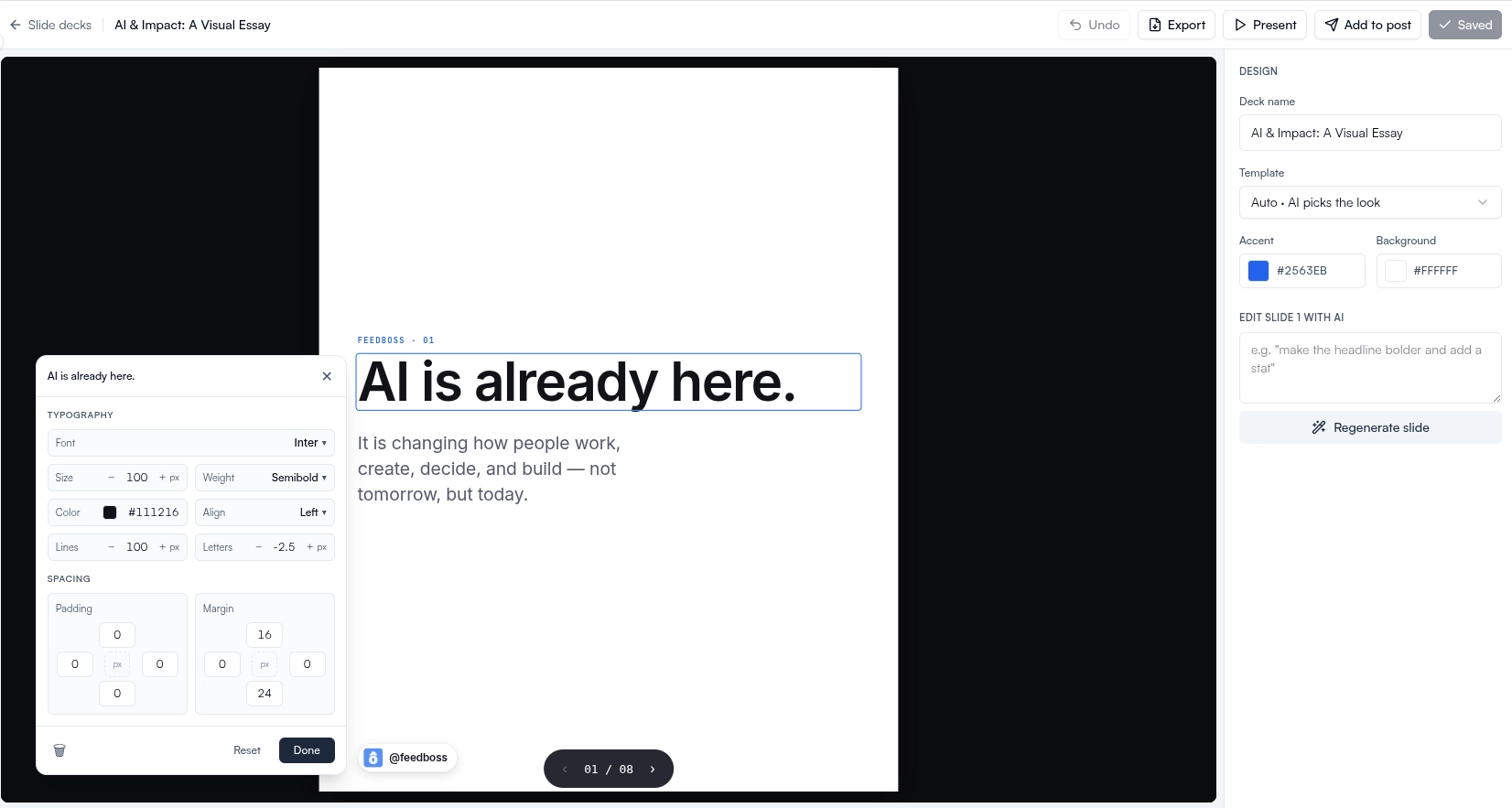
Double-click any text to edit it in place, or open the edit popover to change fonts, weight, alignment, colors, and images on a slide.
Per-Slide AI Refine
Not happy with a slide? Give a quick instruction like "make the headline punchier and add a stat" and regenerate just that slide.
Reorder, Add, Remove
A thumbnail filmstrip lets you drag slides into order, add a new one, or delete what you do not need, with full undo history.
Present & Export Anywhere
Present full-screen with speaker notes, export to PowerPoint or PDF (the .pptx opens in Keynote too), or add the deck straight to a LinkedIn post.
Designer Templates Across Every Aesthetic
Each template is a complete type and color system, so your deck looks designed from the first slide. Pick the look you want, or choose Auto and let FeedBoss match a style to your topic.
Editorial
Swiss
Bold
Luxury
Tech
Retro
Modern
Minimal
Corporate
Organic & Playful
Refine Every Slide, Down to the Word
Because every slide is editable text, nothing is locked in. Edit text inline, restyle with the popover, tune typography and color, or hand a single slide back to the AI with a fresh instruction.
Inline Text Editing
Double-click any headline, body line, or label and type. What you see is what you get.
Edit Popover
Select an element to open a floating editor for font family, weight, alignment, text and background color, and images.
Per-Slide Regenerate
Give one slide a fresh instruction and regenerate only that slide. The rest of the deck stays exactly as it is.
Drag-to-Reorder Filmstrip
A live thumbnail strip shows every slide. Drag to reorder, or use the arrows that appear on hover.
Add & Remove Slides
Add a slide where you need one or delete the ones you do not, with full undo history behind you.
Swap Images & Colors
Insert or replace an image on a slide, adjust how it fits, and recolor accents to match your message.
How It Works
Describe Your Deck
Type what the deck should cover. Optionally turn on Knowledge Base, attach a PDF, paste a URL, or enable your Brand Kit.
Pick a Template
Choose from the full library of designer templates, or let Auto pick the style that fits. FeedBoss writes the slides for you.
Refine Each Slide
Edit text inline, restyle with the popover, regenerate a single slide, and drag slides into the order you want.
Present or Export
Present full-screen, export to PowerPoint or PDF, or add the deck to a LinkedIn post as a document carousel.
Who It's For
Built for LinkedIn creators at every level
Founders & Creators
Ship a polished, on-brand deck for a LinkedIn document post or a quick talk without opening a design tool.
Marketing & Content Teams
Spin up consistent, branded decks at volume, grounded in your own knowledge base so the facts stay right.
Coaches & Consultants
Turn a framework or lesson into a clean teaching deck, then export to PowerPoint or present it live.
Frequently Asked Questions
How is this different from the carousels in Image Studio?
What can I export to?
How many slides can a deck have?
Can I base a deck on my own material?
Can I edit the text after generating?
Will my deck match my brand?
Related Features
Explore more tools in the FeedBoss platform
AI Post Generator
Generate publish-ready LinkedIn posts in single or batch mode with AI that learns your voice.
Learn more →Image Studio
Generate images, infographics, and carousels from a single prompt with dozens of templates, style references, and AI editing.
Learn more →Knowledge Base
Turn voice memos, PDFs, and notes into organised, reusable pages - then ground every post, carousel, and chat in what you actually know.
Learn more →Lead Magnets
Create checklists, swipe files, templates, and frameworks to grow your email list and authority.
Learn more →Ready to own your LinkedIn?
Pick your voice
Set your tone, topics, and style. FeedBoss learns how you write so every post sounds like you.
Generate & customize
Get AI-drafted posts, carousels, and hooks. Edit or publish as-is.
Post & grow
Schedule content, track what works, and watch your audience grow week over week.