Most LinkedIn summaries read like someone copied and pasted their resume into a text box and called it done.
Here is what that costs you: no visibility in search results, zero personality, and a profile that looks exactly like everyone else in your industry.
Your LinkedIn summary is the only place on your entire profile where you control the narrative. No job titles, no bullet points, no dates. Just you, explaining who you are in your own words.
This guide shows you how to write a summary that makes people want to keep reading, helps you appear in the right searches, and turns profile visitors into connections, opportunities, and clients.
What Your Summary Really Does (Not What You Think)
Your LinkedIn summary is not a mini-resume. It is three things working together:
- It is a search engine result. Both LinkedIn and Google index your summary. The keywords you use determine whether you appear when someone searches for expertise like yours.
- It is a vibe check. People decide in seconds whether they want to know more about you. Your summary either makes them curious or makes them click away.
- It is a filter. A good summary attracts the right people (potential clients, collaborators, employers) and screens out the wrong ones (time-wasters, poor-fit opportunities).
Understanding what it does is step one. Here is why most people still get it wrong.
The Three Mistakes That Make Summaries Forgettable
- Writing it like a job description
- Skipping the specifics
- Forgetting it is a conversation
- Writing it like a job description. "Results-driven marketing professional with 10+ years of experience..." sounds like every other marketer on LinkedIn. It tells people nothing about what makes you different.
- Skipping the specifics. Vague claims like "excellent communicator" or "strategic thinker" mean nothing without proof. Numbers, outcomes, and concrete examples make you credible.
- Forgetting it is a conversation. Writing in third person ("Jane Smith is a consultant who...") creates distance. Your summary should sound like you are talking to someone at a coffee shop, not reading from a script.
Now that you know what to avoid, here is what actually belongs in a strong summary.
The Five Core Elements Every Strong Summary Contains
Think of your summary as five building blocks. You do not need all five for every profile, but the best summaries include at least three or four.
- Opening Line
- Proof Point
- Context
- Human Detail
- Clear Next Step
1. The Opening Line
Your first sentence does one job: make people want to read the second sentence.
Three approaches that work:
- The specific claim: "I have helped 50+ SaaS companies grow from $0 to $1M ARR without paid ads."
- The unexpected detail: "I used to be a high school teacher. Now I build AI products."
- The clear position: "I am a brand designer for companies that refuse to look like everyone else."
What does not work: generic greetings ("Hi, I'm Sarah!"), thank yous ("Thanks for visiting my profile"), or stating the obvious ("I'm a passionate marketing professional"). If you are stuck on the first line, a hook generator is a fast way to get past the blank page.
2. The Proof Point
One specific, measurable thing you have accomplished. This builds credibility fast.
- "Grew a newsletter from 0 to 175,000 subscribers in 18 months."
- "Led product launches that generated $45M in revenue."
- "Managed a team of 30 across 4 countries."
Vague claims are forgettable. Specific numbers stick.
3. The Context
This is where you connect the dots between what you have done and where you are going. It answers the question: how did you get here, and what are you building toward?
- For career changers: explain the pivot without being apologetic about it.
- For specialists: show the through-line in your expertise.
- For entrepreneurs: share what you learned that led to starting your business.
4. The Human Detail
One thing that makes you memorable as a person, not just a professional.
This is not your hobbies ("I love hiking and reading"). It is a trait or interest that shapes how you work:
- "I am neurodivergent, which is why I build systems for everything."
- "I grew up translating for my immigrant parents, which taught me how to communicate across cultures."
- "I have lived in 6 countries, so I think about markets globally by default."
5. The Clear Next Step
Tell people exactly what to do if they want to connect, work with you, or learn more.
Weak CTAs:
- "Feel free to reach out!"
- "Let's connect!"
Strong CTAs:
- "DM me if you want help scaling your LinkedIn presence."
- "Email me at [address] to discuss consulting projects."
- "Follow me for daily posts about product management."
These five elements give you the ingredients. Here is how to assemble them.
The Step-by-Step Writing Process
Most people fail at writing their LinkedIn summary because they start at the beginning. They try to craft the perfect opening line before they know where their story is going.
That is backwards.
The best summaries are built in a specific order, and it is not the order people read them. You start with what is easiest to write (your accomplishments), then add context, then create the hook that pulls people in.
- Start with your proof point
- Add the context
- Write your opening line
- Add the human element
- Close with your CTA
- Cut what does not matter
Step 1: Start with your proof point
Do not write your opening line first. Start with the easiest part: what you have accomplished.
Write 3 to 5 sentences about:
- Specific results you have delivered
- Companies or clients you have worked with
- Recognition you have received (awards, features, milestones)
Step 2: Add the context
Look at what you just wrote. Now explain how you got there.
Answer these questions for yourself: what path led you to this point? What moments shaped your approach? What do people misunderstand about your journey?
Step 3: Write your opening line
Now that you know where your story goes, create a first sentence that hooks people into reading it.
Test it by asking: would this make someone curious if they saw it in a search result?
Step 4: Add the human element
Write one sentence about who you are beyond your job title. Make it relevant to how you work, not random.
Step 5: Close with your CTA
Be direct. What do you want people to do after reading this?
Step 6: Cut everything that does not matter
Read it out loud. Delete any sentence that sounds like corporate jargon. Remove any word you would not say in conversation.
The structure works, but how you format it changes how people read it.
The Readability Rules
People skim. They do not read every word on LinkedIn.
Your summary might be brilliantly written, but if it looks like a wall of text, nobody will bother. How you format your summary matters as much as what you say.
- Short paragraphs
- Strategic white space
- Bullets for lists only
- Skip symbols and emojis
- Mobile-friendly
These five rules make your summary easy to scan, easy to read, and easy to remember:
- Break it into short paragraphs. Write 2 to 3 lines maximum. Long blocks of text get skipped.
- Use white space strategically. Space between paragraphs makes your summary scannable on mobile.
- Add bullets when listing things. Use them for results ("Grew revenue by X%"), services you offer, and companies you have worked with. Do not use them for your story, your background, your approach, or anything that needs context.
- Skip the symbols and emojis, usually. Unless you are in a creative field, they often look unprofessional. The profiles that use them heavily work because the whole brand is visual.
- Make it mobile-friendly. Most LinkedIn browsing happens on phones. Check how your summary looks on a small screen before you publish it.
Formatting helps people read it. Keywords help them find it.
How to Show Up in More Searches (Without Keyword Stuffing)
LinkedIn's search algorithm looks for specific terms in your summary. So does Google when someone searches for your expertise.
- Keyword placement
- Synonym strategy
- Tools and platforms
- Avoid keyword stuffing
Where to include keywords:
- Your opening line (what you do)
- Your proof points (what you have achieved in a given industry)
- A "specialties" line at the end
The synonym strategy. Do not just say "marketing." Include related terms people might search for: digital marketing, content strategy, growth marketing, brand positioning.
Tools and platforms. If you use specific software, mention it: "I work with teams using Salesforce, HubSpot, and Marketo" or "Experienced in Python, SQL, and Tableau." This helps you appear when recruiters search for candidates with those skills.
What not to do. Do not create a paragraph that is just a list of keywords. It reads terribly, and LinkedIn may deprioritize your profile for it.
Keywords help with visibility. These frameworks help with different situations.
Frameworks for Different Career Situations
Not every LinkedIn summary should follow the same formula.
A 22-year-old looking for their first job has different challenges than a 45-year-old executive. A career changer needs to address the elephant in the room. A freelancer needs to prove credibility without a company name behind them.
These five frameworks handle the most common situations. Pick the one that matches where you are right now, then adapt it to sound like you.
1. The Career Changer
- Open with what you do now
- Acknowledge the shift
- Explain what translates
- Share what you learned
Challenge: your past does not match your present.
Approach:
- Open with what you do now
- Acknowledge the shift directly ("I used to be an X, now I'm a Y")
- Explain what translates (the skills that carried over)
- Share what you learned that others in your new field might miss
Example structure: "I help [who] with [what]. Before this, I spent 10 years in [old field]. That background taught me [transferable insight] that most [new role] miss."
2. Early in Your Career
- Lead with what you are building
- Highlight projects and internships
- Show initiative
- End with what you want
Challenge: limited experience to showcase.
Approach:
- Lead with what you are learning or building
- Highlight school projects, internships, or freelance work
- Show initiative (side projects, self-learning, contributions)
- End with what you are looking for
Example structure: "I'm a [role] focused on [specific area]. Currently studying [X] at [school] and working on [project] to [outcome]. Looking to [goal]."
3. Senior Leader or Executive
- Current impact
- Scale of operation
- Evolving insights
- Hands-on approach
Challenge: sounding relevant without sounding outdated.
Approach:
- Lead with current impact, not job title
- Quantify the scale you operate at
- Share what you have learned that is different now versus 10 years ago
- Make it clear you are hands-on, not just strategic
Example structure: "I lead [function] for [type of company], which means [specific responsibility]. After [X years] in this space, here's what I know: [insight]. Currently focused on [what matters now]."
4. Freelancer or Consultant
- Specificity
- Client results
- Recognizable clients
- Easy hiring
Challenge: establishing credibility without a big company name.
Approach:
- Be specific about who you help and how
- Share client results, not just your services
- Include recognizable companies or publications if you have them
- Make it easy to hire you (clear CTA with a contact method)
Example structure: "I help [specific type of client] [achieve specific outcome]. My clients have [result]. Worked with [names if possible]. If you're [situation], email me at [address]."
5. Technical or Specialized Role
- Describe the problem
- Use analogies
- Include technical terms
- Communicate across audiences
Challenge: explaining complex work to non-experts.
Approach:
- Describe the problem you solve, not your job title
- Use analogies or simple comparisons
- Include technical terms for searchability but explain impact in plain language
- Show you can communicate across technical and business audiences
Example structure: "I build [what] for [who]. Think of it as [simple analogy]. I work with [technologies] to [business outcome]."
Frameworks give you structure. Real examples show you what works in practice.
Real Examples, Analyzed
Here are five public LinkedIn summaries from well-known profiles, with what works, what does not, and what you can borrow.
Example 1: Steven Bartlett
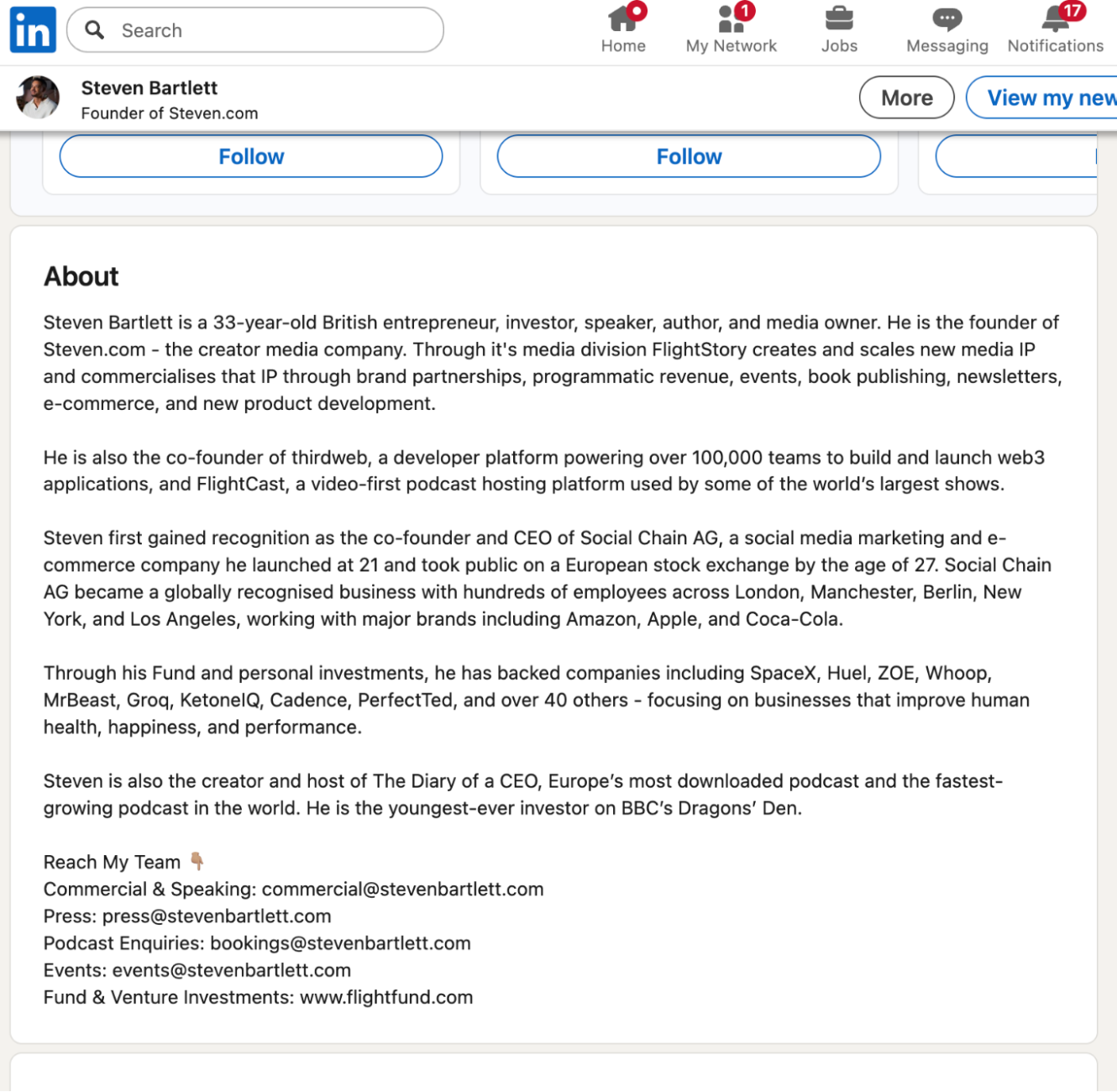
What works:
- Immediate credibility with age plus accomplishments
- Specific company names (Social Chain, thirdweb)
- Clear contact information for different types of inquiry
- Names major brands he has worked with (Amazon, Apple, Coca-Cola)
What does not work:
- Very dense, reads like a press release
- No personality or human element
- Could have been written by a PR team, so it does not sound like him talking
What you can borrow: start with an overview then dive into specific ventures, include contact info for different purposes, and list notable companies or brands you have worked with. What to skip: the formal third-person tone and cramming every achievement into one paragraph.
Example 2: Guillaume Moubeche
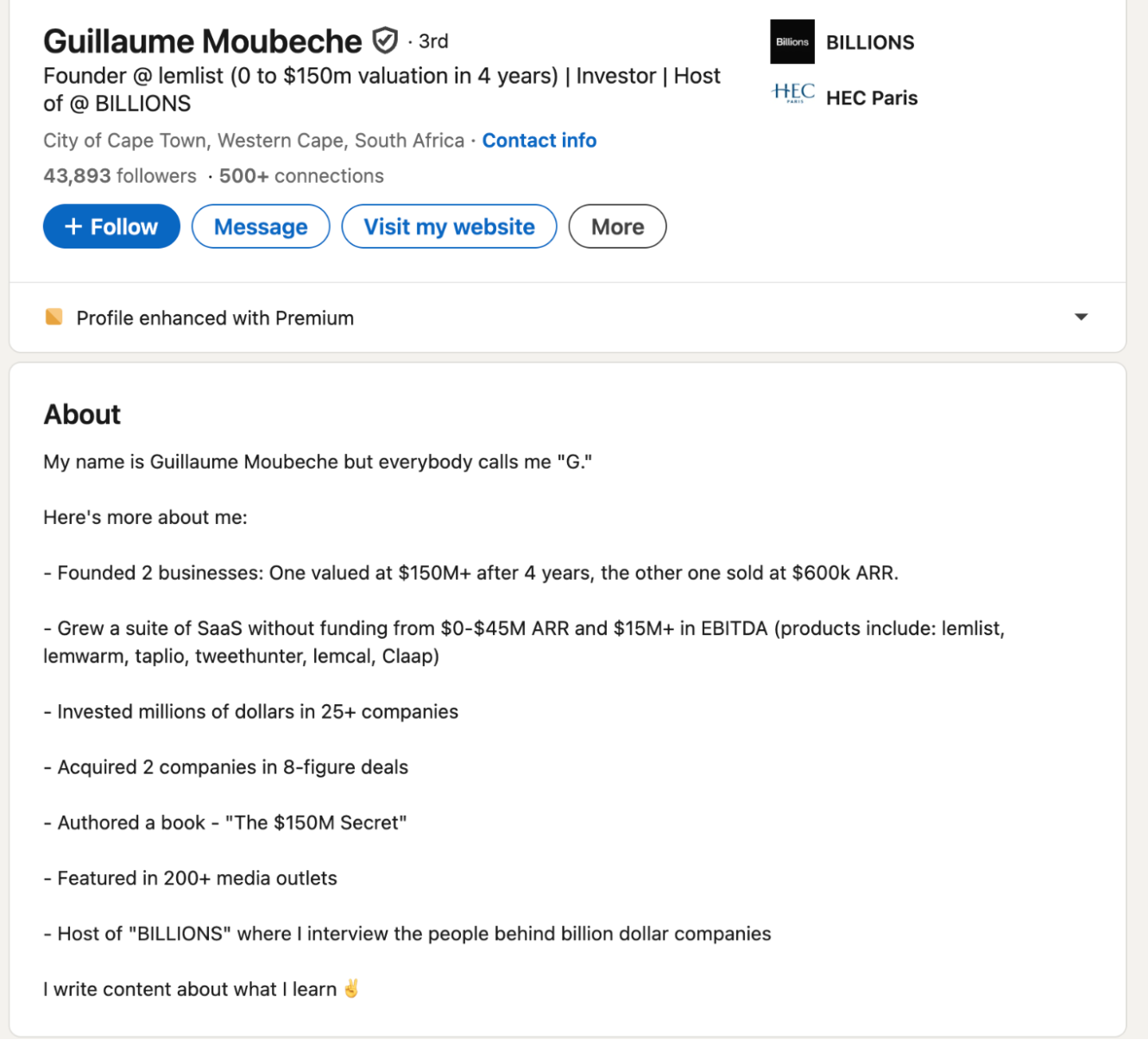
What works:
- Introduces his nickname immediately ("everybody calls me G")
- Bullet format makes it scannable
- Numbers create credibility ($150M valuation, $45M ARR)
- Shows range: founded, grew, invested, acquired, authored
What does not work:
- Pure achievement list with no story
- No personality beyond the nickname
- Does not explain what he actually does day to day
What you can borrow: the bullet format for accomplishments, leading with a nickname if you have one, and specific revenue or valuation numbers. What to skip: the laundry list without context, and leaving out any "why" or mission.
Example 3: Paul Storm
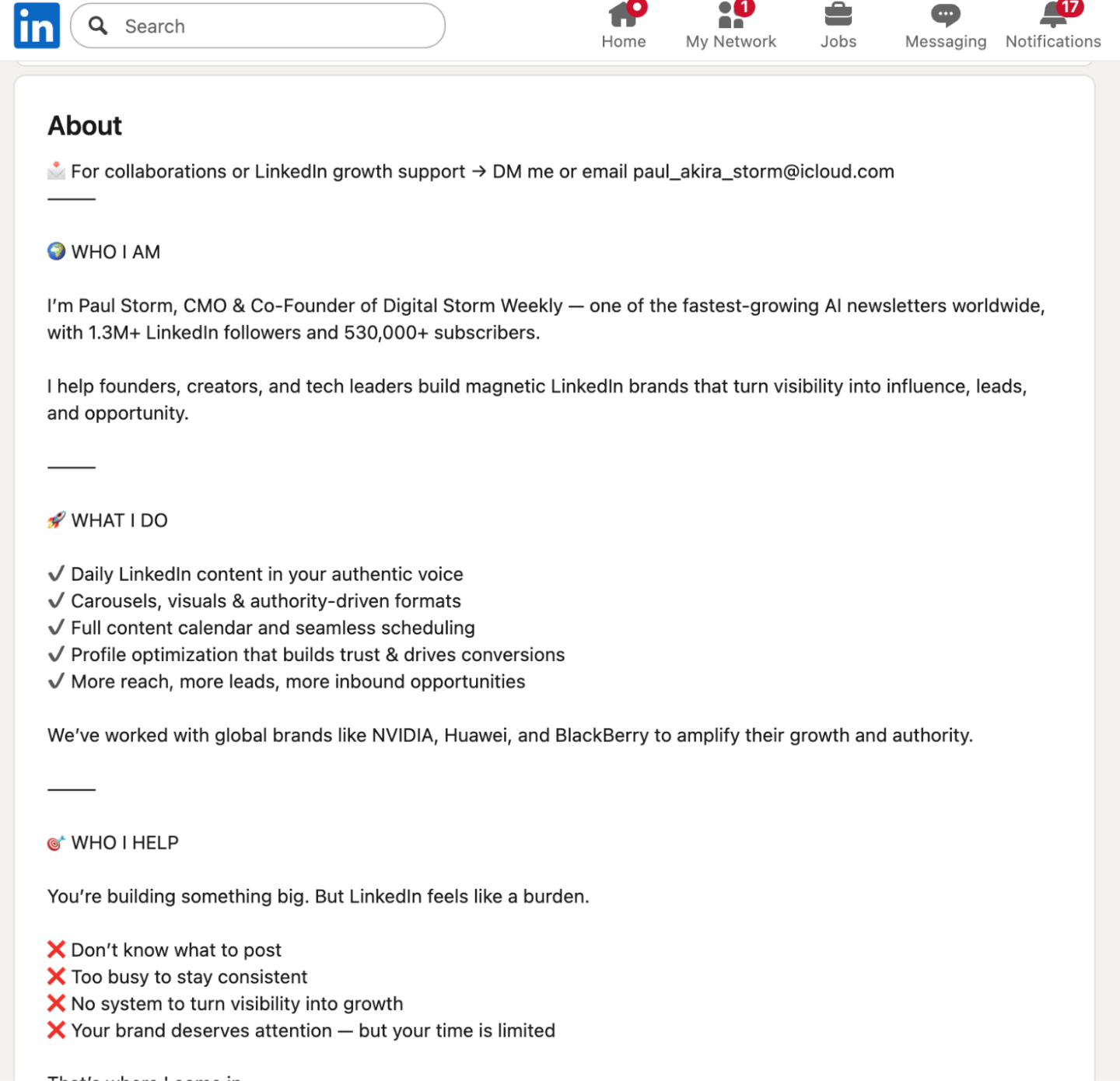
What works:
- Clear CTA at the top (DM me or email)
- Sections with headers (WHO I AM, WHAT I DO)
- Addresses pain points directly ("Don't know what to post")
- Specific offer explaining what you get if you work with him
What does not work:
- Heavy use of symbols and emojis feels salesy
- Very long for a service provider
- Reads more like a sales page than a summary
What you can borrow: the sectioned structure with clear headers, addressing specific problems your audience has, and a clear service offering. What to skip: excessive symbols and making it feel like a landing page.
Example 4: Bill Gates
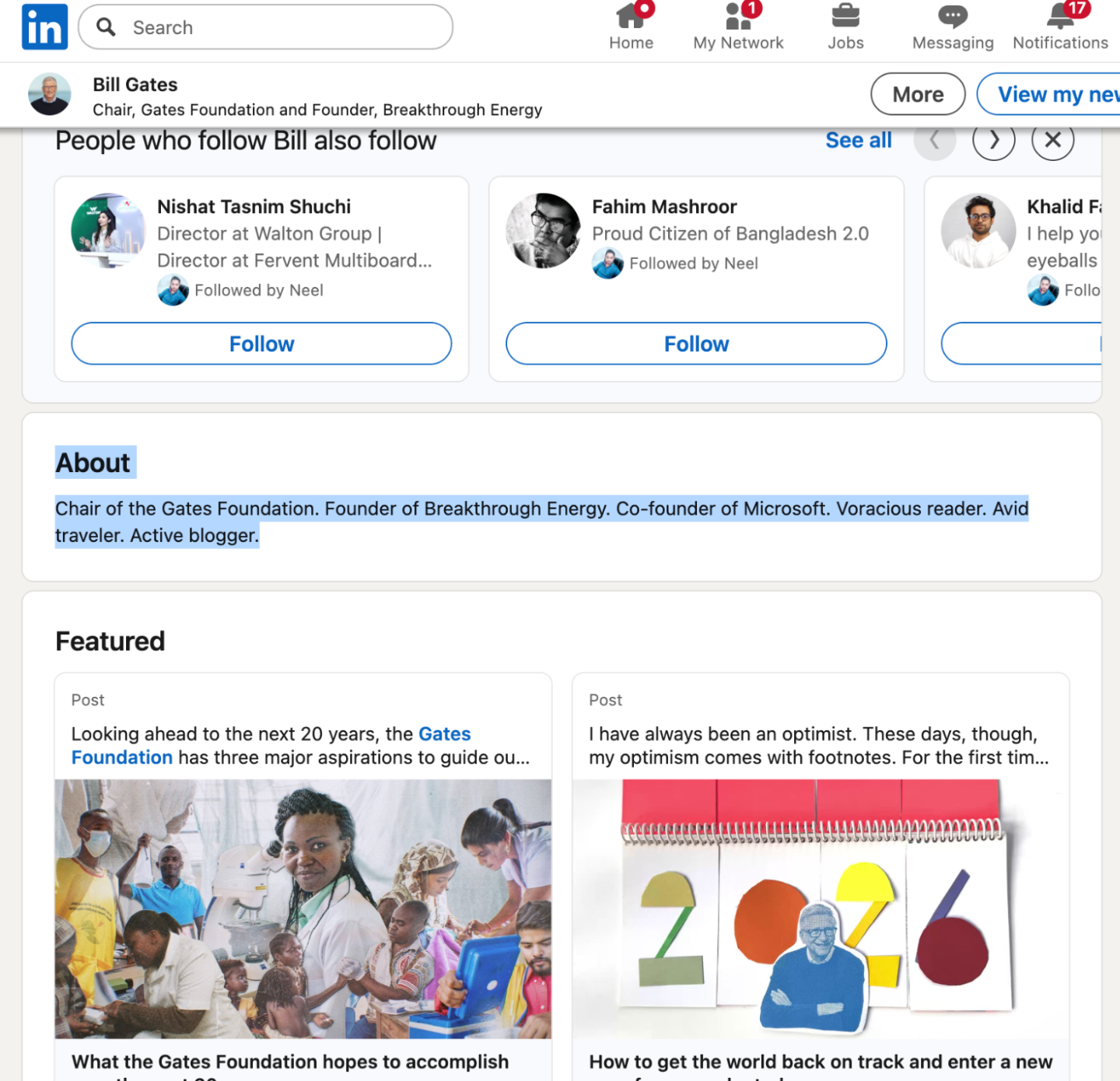
What works:
- Extremely concise
- Each phrase is a distinct identity (Chair, Founder, Co-founder, Reader, Traveler, Blogger)
- Relies on name recognition to do the heavy lifting
What does not work:
- Only works if you are already famous
- No CTA or way to engage
- Does not help with search because there are no keywords
What you can borrow: short, punchy structure and multiple identity markers. What to skip: this approach entirely, unless you are globally recognized.
Example 5: Justin Welsh
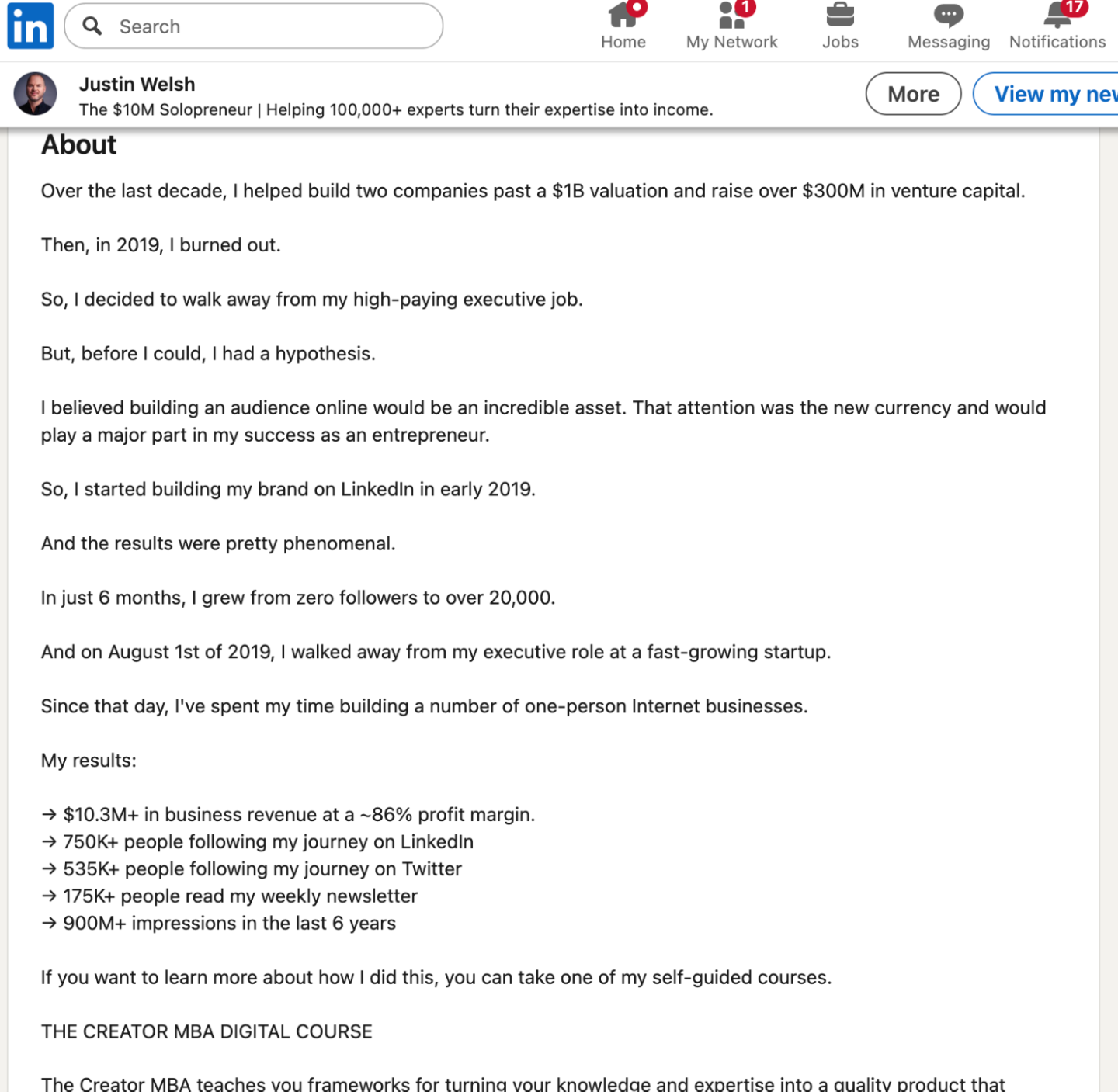
What works:
- Story arc: executive, then burnout, then entrepreneur
- Hypothesis explained ("attention is the new currency")
- Results in bullet format (revenue, followers, impressions)
- Clear product pitch with links, and visible progression over time
What does not work:
- Very focused on selling courses
- The volume of numbers can feel overwhelming
- Almost no personality beyond metrics
What you can borrow: the before-and-after narrative structure, specific metrics with timeframes, a clear path to your products or services, and social proof. What to skip: making it purely about product sales or overwhelming readers with numbers.
Key takeaway: the best summaries balance credibility (proof) with personality (human element). Most lean too far in one direction.
The Quality Checklist (5-Minute Review)
Before you publish, check these:
- First sentence would make someone want to read more
- Includes at least one specific number or measurable result
- Explains your path in a way that makes sense
- Contains a human detail that makes you memorable
- Has a clear call to action
- Paragraphs are 2 to 3 lines maximum
- No walls of text
- Reads naturally out loud
- Written in first person ("I help..." not "John helps...")
- Includes 3 to 5 core keywords naturally
- Mentions specific tools, platforms, or technologies you use
- First 40 characters work as a standalone search snippet
- Sounds like you talking, not a resume
- Zero clichés ("results-driven," "passionate," "strategic thinker")
- No jargon that would confuse someone outside your industry
If you want a second opinion on the whole profile, not just the About section, run it through a profile strength checker before you publish.
Make Your Whole Profile Support the Summary
A great summary works better when the rest of your profile agrees with it.
- Match your headline to your summary. If your headline says one thing and your About section says another, visitors have to work out which is true. (Need a stronger one? Here are 70+ LinkedIn headline examples.)
- Use the Featured section. Put the case study, article, or product your summary references right underneath it.
- Post regularly. Your summary is the conversion page for every post that reaches someone new. One post a week is enough to keep new people arriving.
- Collect recommendations. They are the proof you cannot write about yourself.
If you would rather start from a draft than a blank box, the FeedBoss LinkedIn summary generator writes a first version from your role, results, and audience, and you edit from there. Adding the real detail is still your job, and it is the part that makes the summary yours.
Final Thoughts: Your Summary Will Evolve
The summary you write today will not be the summary you have in six months. That is exactly how it should be.
Your career changes. Your goals shift. What you want to be known for evolves.
The goal is not perfection. The goal is writing something authentic, clear, and useful that represents who you are right now.
Start with a good enough version. Publish it. See how people respond. Refine it based on what you learn.
The worst summary is the one you never write because you are waiting to make it perfect. Write yours today.
Your summary is one surface. The posts underneath it are the rest.
Start growing7-day money-back guarantee.
Frequently Asked Questions
How long should a LinkedIn summary be?
200 to 300 words is the sweet spot. Long enough to tell your story, short enough that people actually read it. The 2,600-character limit gives you room for roughly 370 words, but you do not need to use them all.
Should I write in first person or third person?
First person, always. "I help companies..." not "Sarah helps companies..." Third person creates distance and sounds like someone else wrote it for you.
Can I use emojis in my LinkedIn summary?
It depends on your industry. Creative fields like design, marketing, and content can get away with it. Conservative fields like finance, legal, and healthcare should skip them. When in doubt, leave them out.
Should I list all my skills in the summary?
No. There is a separate Skills section for that. Your summary should include your top 3 to 5 areas of expertise woven naturally into your story, not stacked as a list.
I'm a student. Should I even have a summary?
Yes. Focus on what you are learning, what you are building (projects, internships), and what you are looking for (internships, entry-level roles, mentorship).
How often should I update my LinkedIn summary?
Every 3 to 6 months, or whenever your goals change. If you switch jobs, launch a business, or pivot your focus, update it to reflect that.
What if I have multiple careers or roles?
Address it directly. "I'm a software engineer by day and a fiction writer by night," or "I split my time between consulting and angel investing." Clarity beats trying to hide it.